

The x86 architecture is one of the most widely used processor designs in the world.
It powers everything from classic PCs running MS-DOS to modern operating systems like Windows and Linux.
Modes of Operation#
The x86 processor family (Intel IA-32 and 32-bit AMD) can work in different “modes.”
These modes decide how programs run and what level of control they have over the system.
Protected Mode (Modern Default)#
- The
native modeof modern x86 CPUs. - Each program gets its own memory space (
segments). - Prevents one program from interfering with others.
- Used in most modern operating systems (Windows, Linux, etc.).
Virtual-8086 Mode (Sub-mode of Protected Mode)#
- Lets old programs (like
MS-DOS software) run safely inside Protected Mode. - Creates a
sandbox environmentfor legacy code. - Example: Windows XP could run multiple DOS programs at the same time.
Real-Address Mode (Old-School Mode)#
- Works like the original
Intel 8086CPU. - Programs have
direct accessto memory and hardware. - No protection → one bad program can crash the whole system.
- Common in older systems like
MS-DOSorWindows 98.
System Management Mode (SMM)#
- A
special hidden modenot used by normal programs. - Handles
low-level system taskssuch as:Power management(sleep, battery)Security checks
- Runs invisibly in the background, controlled by the BIOS or hardware vendor
Basic Execution Environment#
Address Space#
- In
32-bit protected mode, a program can address alinear address space of up to 4 GB. - Starting with the
P6 processor,Extended Physical Addressingallows up to64 GBof physical memory. - In
real-address mode, programs can only address1 MBof memory. - In
virtual-8086 mode, each program has its own1 MB address space, even if multiple programs are running.
Basic Program Execution Registers#
Registers are high-speed storage locations inside the CPU.
They are much faster to access than memory, so loops and critical data often use registers instead of variables.
There are:
- 8 general-purpose registers
- 6 segment registers
- 1 processor status flags register (EFLAGS)
- 1 instruction pointer (EIP)
32-bit General-Purpose Registers#
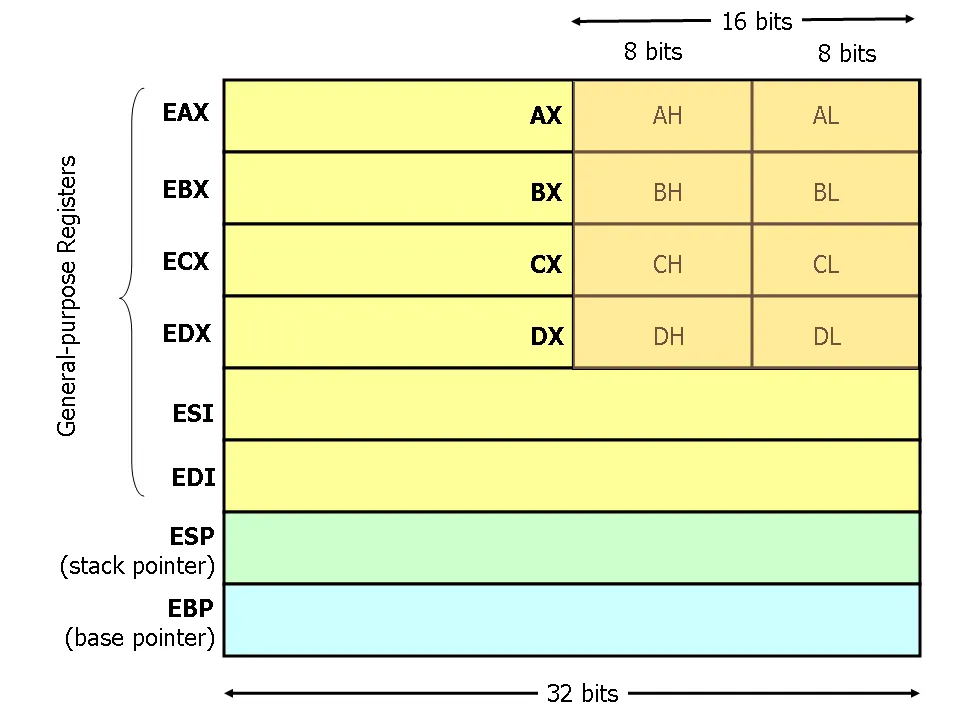
EAX EBX ECX EDX EBP ESP ESI EDI
Each of these 32-bit registers can also be accessed in smaller parts:
| 32-Bit | 16-Bit | 8-Bit (High) | 8-Bit (Low) |
|---|---|---|---|
EAX | AX | AH | AL |
EBX | BX | BH | BL |
ECX | CX | CH | CL |
EDX | DX | DH | DL |
The remaining general-purpose registers can only be accessed using 32-bit or 16-bit names, as shown in the following table:
| 32-Bit | 16-Bit |
|---|---|
ESI | SI |
EDI | DI |
EBP | BP |
ESP | SP |
Specialized Uses of General-Purpose Registers#
EAX: used automatically for multiplication and division. Known as theaccumulator register.ECX: used automatically as aloop counter.ESP: points to thestack(extended stack pointer). Rarely used for general arithmetic.ESI / EDI: used forfast memory transfers(sourceanddestination index registers).EBP: used by high-level languages to referencefunction parametersandlocal variables(extended frame pointer).
Segment Registers#
- In
real-address mode, segment registers containbase addressesof memory areas (code,data,stack). - In
protected mode, they point tosegment descriptor tablesinstead. - Segment registers:
CS,SS,DS,ES,FS,GS.
| Register | Description |
|---|---|
CS (Code Segment) | Points to the segment containing the executable program code. Instructions are fetched from the CS segment. |
DS (Data Segment) | Points to the segment containing the data used by the program. Most memory references come from the DS segment. |
SS (Stack Segment) | Points to the segment containing the stack, used for storing temporary data such as function parameters, return addresses, and local variables. |
ES (Extra Segment) | Points to an additional data segment that can be used for various purposes, such as string operations. |
FS / GS | Introduced with the Intel 80386 processor. Can be used for special purposes, such as thread-local storage or per-CPU data. |
Instruction Pointer#
- The
EIP registercontains theaddress of the next instructionto be executed. - Certain instructions change
EIPto branch to new code locations.
EFLAGS Register#
The EFLAGS register contains binary flags that either:
- Control how the CPU operates (
control flags) - Reflect the result of operations (
status flags)
Control Flags#
- Allow the CPU to break after each instruction.
- Enable interrupts.
- Switch into
protected modeorvirtual-8086 mode.
Status Flags#
These reflect outcomes of arithmetic and logic operations:
CF (Carry flag): set if an unsigned result is too large.OF (Overflow flag): set if a signed result is too large or too small.SF (Sign flag): set if the result is negative.ZF (Zero flag): set if the result is zero.AF (Auxiliary Carry): set if a carry occurs from bit 3 to bit 4 in 8-bit operations.PF (Parity flag): set if the lowest byte has an even number of 1 bits.
Intel64 for 64-bit Processing#
Intel64 is Intel’s version of the x86-64 architecture, originally developed by AMD.
It allows processors to use a 64-bit linear address space, meaning programs can theoretically access a huge amount of memory. In practice, processors usually implement slightly less than the full 64 bits.
The physical memory supported can exceed 64 GB.
Intel64 is backward compatible with 32-bit programs, so older software runs without performance loss.
- First used in the
Pentium Extremeprocessor - Also found in
Intel Xeon,Celeron D,Pentium D,Core 2,Core i7,Atom, and newer Pentium 4 processors
IA-32e Mode#
Intel64 supports all the old IA-32 modes (Protected, Real-address, System Management) plus a new IA-32e mode for 64-bit processing.
IA-32e mode has two sub-modes for 64-bit operating systems like Windows Vista or Linux:
| Sub-mode | Description |
|---|---|
Compatibility Mode | Runs legacy 16-bit and 32-bit programs without recompilation. Operands are 16 or 32 bits, and the addressable memory range is 4 GB. |
64-bit Mode | Uses 64-bit addresses and operands, a greater number of registers, and extra instructions for handling large data. Memory segmentation is disabled, providing a flat 64-bit linear-address space. Applications in 64-bit mode cannot use real-address or segmented modes. |
Compatibility mode (older software) or 64-bit mode (modern software).This allows mixing old and new programs safely.
Intel64 processors are used across many Intel families, but specifications vary.
Common Assembly instructions#
- Before diving into
assembly instructions, I recommend watching this video. It explains how the CPU works in detail, and even if you already know the basics, you’ll gain deeper insight into howopcodes,instructions, andflagswork under the hood.
mov — moves data from one location to another without modification.
mov destination, source
add — arithmetic addition; adds a value to the destination and stores the result.
add destination, value
sub — arithmetic subtraction.
sub destination, value
inc — increments the destination by 1.
inc destination
dec — decrements the destination by 1.
dec destination
lea — load effective address; calculates an address and stores it in the destination (not the memory contents).
lea destination, value
cmp — compares two operands by subtracting the source from the destination.
cmp destination, source
The result is not stored anywhere, but the EFLAGS register is updated
(Zero flag, Sign flag, Carry flag, Overflow flag, etc.) so that conditional jumps can act on it.
jmp — jumps to a new location, changing the instruction pointer.
jmp destination
Other logic operations like or, and, and xor follow similar addressing rules as add and sub.
Addressing#
Instructions may require one or more operands.
When an instruction uses two operands, the second is the source, which contains data or an address.
Addressing uses segment registers and comes in three types:
Register addressing — the operand is in a register
Immediate addressing — the operand is a constant in the instruction
Register and memory addressing — the operand points to a memory location
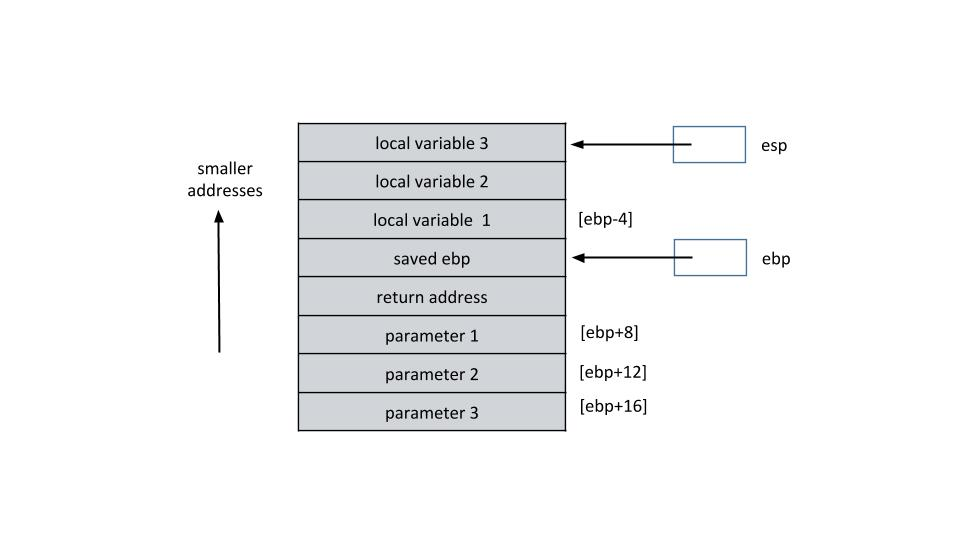
Return Address — a parameter that tells a function where to resume execution after it finishes. Functions can be called from multiple locations, so the return address ensures correct program flow.
The Stack#
Each active function call has a
stack framestoring all local variables.All active frames are stored on the
Stack, a critical memory structure.The stack holds
temporary data, function parameters, return addresses, and more.Stack memory is
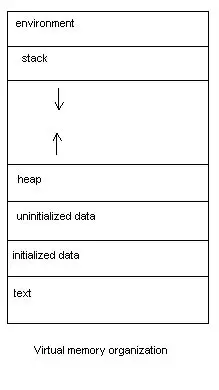
static(allocated at compile-time), unlikethe heap, which is dynamic (malloc() / new).LIFObehavior: Last In, First OutStack grows downwards: from high memory addresses to low addresses.
Stack Instructions#
push value — decrements ESP by the size of value and copies it to the top of the stack.
push value
pop destination — copies the value from the top of the stack to the destination and increments ESP.
pop destination
Extended Stack Instructions#
These are often used by malware or low-level programs:
pusha— pushes all 16-bit registers (AX,CX,DX,BX,SP,BP,SI,DI) onto the stack.pushad— pushes all 32-bit registers (EAX,ECX,EDX,EBX,ESP,EBP,ESI,EDI) onto the stack.popa— pops all 16-bit registers (inverse ofpusha).popad— pops all 32-bit registers (inverse ofpushad).
The Heap#
- The Heap is a memory region used for dynamic memory allocation.
- Unlike the stack (which is managed automatically), memory in the heap must be explicitly requested (
malloc(),calloc(),new) and freed (free(),delete). - Heap memory persists until freed — it does not vanish after a function returns.
- It’s generally larger than the stack but also slower because it requires system calls and bookkeeping.
- Heap memory is prone to fragmentation and vulnerabilities (e.g., heap overflows, use-after-free, double free).
- Managed in low-level C libraries by functions like
brk()andmmap()in Linux.
Key Points#
- Flexible size: Allocate as much as needed (until OS limits).
- Manual management: Programmer must release memory, or else leaks occur.
- Unordered growth: Unlike the stack’s LIFO model, the heap does not enforce a strict order.
- Heap grows upwards: From low memory addresses to higher ones (opposite to stack).
code snippet#
int *arr = malloc(10 * sizeof(int)); // allocate space for 10 ints
free(arr);                           // release memory
Conditional Jumps#
Conditional jumps change the flow of execution based on the result of the previous comparison (cmp) or arithmetic instruction.
They rely on EFLAGS (Zero flag, Sign flag, Carry flag, Overflow flag, etc.).
Instructions#
je — Jump if Equal (a.k.a. jz, Jump if Zero).
cmp eax, ebx
je equal_label      ; jump if eax == ebx
jne — Jump if Not Equal
cmp eax, ebx
jne equal_label      ; jump if eax == ebx
ja— Jump if Above (a.k.a.jnbe, Jump if Not Below or Equal)jae— Jump if Above or Equal (a.k.a.jnb, Jump if Not Below)jb— Jump if Below (a.k.a.jnae, Jump if Not Above or Equal)jbe— Jump if Below or Equal (a.k.a.jna, Jump if Not Above)jg— Jump if Greater (a.k.a.jnle, Jump if Not Less or Equal)jge— Jump if Greater or Equal (a.k.a.jnl, Jump if Not Less)jl— Jump if Less (a.k.a.jnge, Jump if Not Greater or Equal)jle— Jump if Less or Equal (a.k.a.jng, Jump if Not Greater)js— Jump if Sign (negative)jns— Jump if Not Sign (non-negative)jo— Jump if Overflowjno— Jump if Not Overflowjc— Jump if Carryjnc— Jump if Not Carryjp— Jump if Parity (a.k.a.jpe, Jump if Parity Even)jnp— Jump if Not Parity (a.k.a.jpo, Jump if Parity Odd)
WORD#
A WORD is just two bytes of data. A DWORD is four bytes of data. A QWORD is eight bytes of data.
Basic Examples#
Stack frame#
In this example, we’ll compile a simple C program and inspect how the function interacts with the stack during execution. This will help us understand how local and global variables are stored and accessed in memory.
#include <stdio.h>

int M = 5; // Global variable

int add_func(int var) {
    int L = 0; // Local variable
    L = M + var;
    return L;
}

int main() {
    printf("The result is %d\n", add_func(1));
    return 0;
}
To compile the program in 32-bit mode :
gcc -m32 stack_frame.c -o stack_frame # mode : 32-bit
To verify the format :
file stack_frame
stack_frame: ELF 32-bit LSB pie executable, Intel 80386 ...
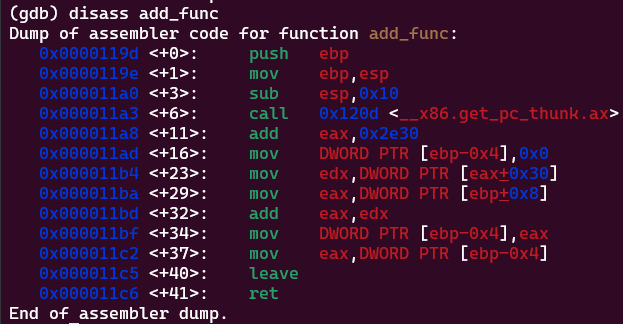
- Function Prologue :
push ebp
mov ebp, esp
sub esp, 0x10 #(1*16^1 + 0*16^0 = 16)
Sets up a new stack frame for the function.
Allocates space for local variables (16 bytes in this case).
- Accessing the Global Variable
M:
call __x86.get_pc_thunk.ax
add eax,0x2e30
mov edx, [eax+0x30]
- Accessing the Function Parameter
var:
mov eax, [ebp+0x8]
[ebp+0x8] points to the first argument var.- Performing the Addition :
add eax, edx
mov [ebp-0x4], eax
M and var.
Stores the result in the local variable L.- Function Epilogue :
mov eax, [ebp-0x4]
leave
ret
L into eax to return it.
Restores the previous stack frame and returns to the caller.Bonus#
📄 CheatSheet : x86_64