
Pointers are often considered one of the trickiest aspects of C programming—but they’re also what give the language its remarkable power and flexibility.
What’s a Pointer?#
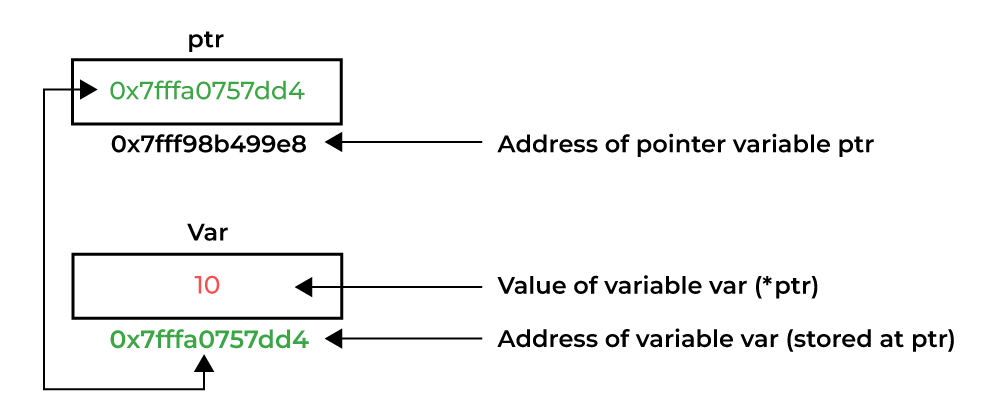
A pointer is a special type of reference that stores the memory address of another variable, array, or data structure—making certain operations more efficient and flexible.
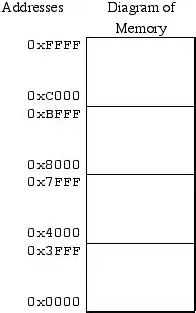
variable but holds the address of another object in memory.Think of memory as a massive apartment building. Each apartment has a unique address (memory address), and each apartment can store data (variables). A pointer is like having the address written on a piece of paper—it tells you where to find the actual apartment, but it’s not the apartment itself.
int x = 42;        // x is a variable storing the value 42
int *ptr = &x;     // ptr is a pointer storing the address of x
In this example:
xcontains the value42ptrcontains the memory address wherexis stored&xmeans “give me the address of x”*ptrmeans “give me the value at the address stored in ptr”
Memory Layout in C Programs#
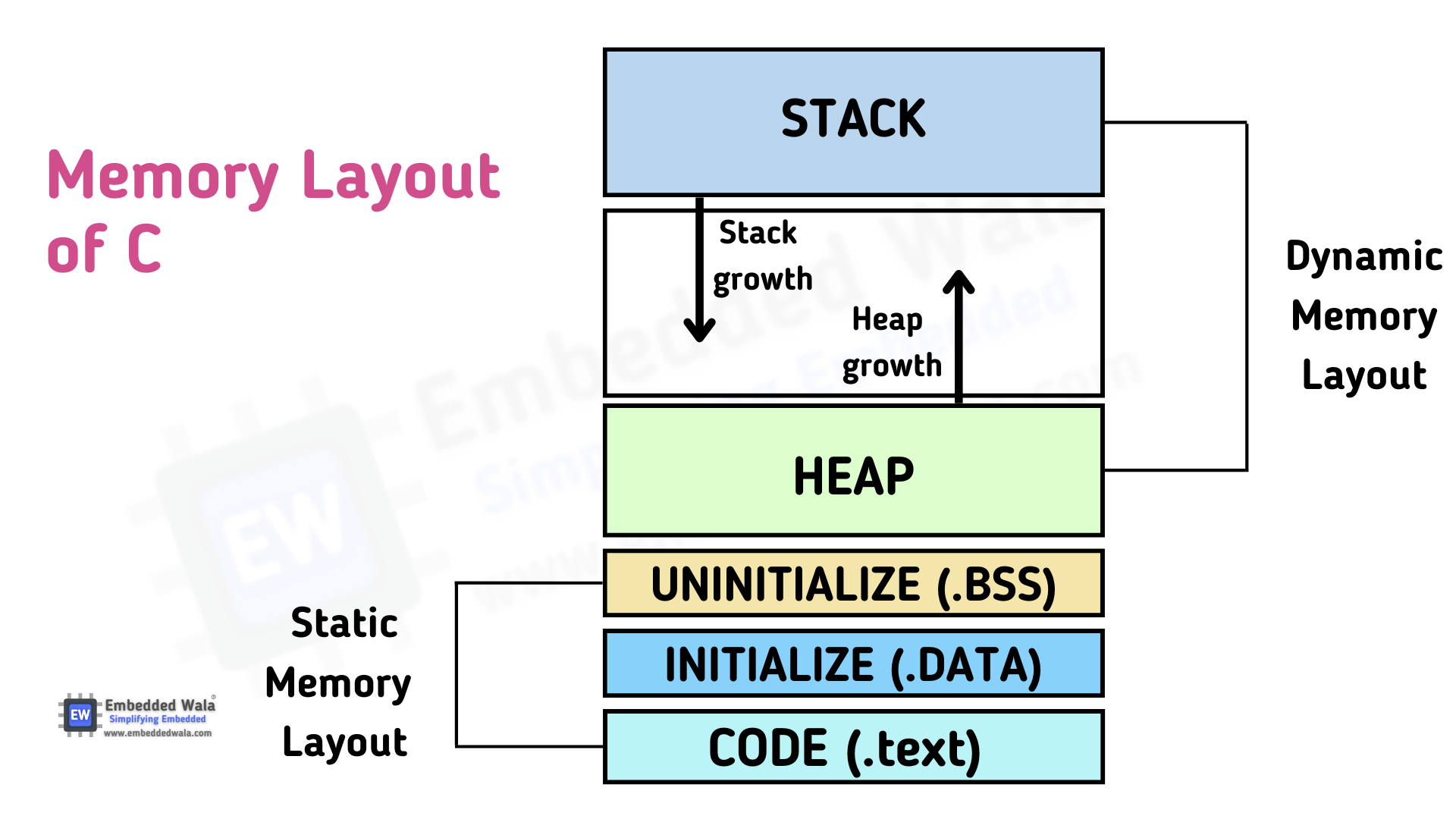
Understanding how C organizes memory is crucial for mastering pointers. A typical C program’s memory is divided into several sections:
Code Segment (Text Segment)#
- Contains the compiled machine code of your program
- Read-only and executable
- Shared among multiple instances of the same program
- Located at low memory addresses
Data Segment#
- Initialized global and static variables
- Divided into read-write and read-only sections
- Exists for the entire program lifetime
int global_var = 100;        // Stored in initialized data segment
static int static_var = 50;  // Also in initialized data segment
BSS Segment (Block Started by Symbol)#
- Uninitialized global and static variables
- Automatically initialized to zero by the system
- More memory-efficient than initialized data
int uninitialized_global;     // Stored in BSS, automatically set to 0
static int uninitialized_static; // Also in BSS
Heap#
- Dynamic memory allocation area (
malloc,calloc,realloc) - Grows upward (toward higher addresses)
- Manual memory management required
- Larger but slower than stack
Stack#
- Local variables, function parameters, return addresses
- Grows downward (toward lower addresses)
- Automatic memory management (LIFO - Last In, First Out)
- Fast but limited in size
void function() {
    int local_var = 10;    // Stored on the stack
    int array[100];        // Also on the stack
}   // Memory automatically freed when function ends
Pointer Declaration and Initialization#
Basic Pointer Declaration#
int *ptr;           // Declares a pointer to int
char *str;          // Declares a pointer to char
float *fptr;        // Declares a pointer to float
Pointer Initialization#
int x = 42;
int *ptr = &x;      // Initialize pointer with address of x

// Or declare then assign
int *ptr2;
ptr2 = &x;          // Assign address of x to ptr2
NULL Pointers#
int *ptr = NULL;    // Initialize to NULL (safe practice)
if (ptr != NULL) {  // Always check before dereferencing
    printf("%d\n", *ptr);
}
NULL or a valid address. Uninitialized pointers contain garbage values and can cause crashes or security vulnerabilities.Pointer Operations#
Address-of Operator (&)#
The & operator returns the memory address of a variable.
int x = 100;
printf("Value of x: %d\n", x);        // Prints: 100
printf("Address of x: %p\n", &x);     // Prints: 0x7fff5fbff6ac (example)
Dereference Operator (*)#
The * operator accesses the value at the memory address stored in the pointer.
int x = 100;
int *ptr = &x;

printf("Value of x: %d\n", x);        // Prints: 100
printf("Value via pointer: %d\n", *ptr); // Prints: 100
printf("Address in pointer: %p\n", ptr); // Prints address of x

*ptr = 200;  // Change x's value through the pointer
printf("New value of x: %d\n", x);    // Prints: 200
Pointer Arithmetic#
Pointers can be incremented, decremented, and compared:
int arr[5] = {10, 20, 30, 40, 50};
int *ptr = arr;  // Points to first element

printf("%d\n", *ptr);       // Prints: 10
printf("%d\n", *(ptr + 1)); // Prints: 20
printf("%d\n", *(ptr + 2)); // Prints: 30

ptr++;                      // Move to next element
printf("%d\n", *ptr);       // Prints: 20
int*, adding 1 moves the pointer by 4 bytes (on most systems).Arrays and Pointers#
Arrays and pointers are closely related in C. In many contexts, an array name acts like a pointer to its first element.
Array-Pointer Equivalence#
int arr[5] = {1, 2, 3, 4, 5};
int *ptr = arr;  // Same as: int *ptr = &arr[0];

// These are equivalent:
printf("%d\n", arr[0]);   // Array notation
printf("%d\n", *arr);     // Pointer notation
printf("%d\n", *ptr);     // Direct pointer access
printf("%d\n", ptr[0]);   // Pointer with array notation
Traversing Arrays with Pointers#
int arr[5] = {10, 20, 30, 40, 50};
int *ptr = arr;

// Method 1: Pointer arithmetic
for (int i = 0; i < 5; i++) {
    printf("%d ", *(ptr + i));
}

// Method 2: Incrementing pointer
ptr = arr;  // Reset pointer
for (int i = 0; i < 5; i++) {
    printf("%d ", *ptr);
    ptr++;
}
Multidimensional Arrays and Pointers#
int matrix[3][4] = {
    {1, 2, 3, 4},
    {5, 6, 7, 8},
    {9, 10, 11, 12}
};

// Pointer to first row
int (*row_ptr)[4] = matrix;

// Access element [1][2] (value 7)
printf("%d\n", matrix[1][2]);           // Direct access
printf("%d\n", *(*(matrix + 1) + 2));   // Pointer arithmetic
printf("%d\n", row_ptr[1][2]);          // Through row pointer
Dynamic Memory Allocation#
Dynamic memory allocation allows programs to request memory during runtime, providing flexibility for data structures whose size isn’t known at compile time.
malloc() - Memory Allocation#
#include <stdlib.h>

// Allocate memory for 10 integers
int *ptr = (int*)malloc(10 * sizeof(int));

if (ptr == NULL) {
    printf("Memory allocation failed!\n");
    return -1;
}

// Use the allocated memory
for (int i = 0; i < 10; i++) {
    ptr[i] = i * i;  // Store squares: 0, 1, 4, 9, 16...
}

// Print the values
for (int i = 0; i < 10; i++) {
    printf("%d ", ptr[i]);
}

// Don't forget to free the memory!
free(ptr);
ptr = NULL;  // Prevent accidental reuse
calloc() - Cleared Allocation#
// Allocate and initialize to zero
int *ptr = (int*)calloc(10, sizeof(int));

if (ptr != NULL) {
    // All elements are already 0
    for (int i = 0; i < 10; i++) {
        printf("%d ", ptr[i]);  // Prints: 0 0 0 0 0 0 0 0 0 0
    }
    free(ptr);
}
realloc() - Resize Allocation#
int *ptr = (int*)malloc(5 * sizeof(int));
// Initialize with values 0, 1, 2, 3, 4
for (int i = 0; i < 5; i++) {
    ptr[i] = i;
}

// Resize to hold 10 integers
ptr = (int*)realloc(ptr, 10 * sizeof(int));
if (ptr == NULL) {
    printf("Reallocation failed!\n");
    return -1;
}

// Old values are preserved, add new values
for (int i = 5; i < 10; i++) {
    ptr[i] = i;
}

free(ptr);
Memory Allocation Best Practices#
Golden Rules of Dynamic Memory:
- Always check if allocation succeeded (ptr != NULL)
- Free every allocated block with
free() - Set pointer to NULL after freeing to prevent double-free errors
- Never use freed memory (use-after-free vulnerability)
- Don’t free the same memory twice (double-free vulnerability)
Common Pointer Pitfalls and Debugging#
1. Uninitialized Pointers#
int *ptr;           // Contains garbage value
*ptr = 42;          // CRASH! Writing to random memory

// Fix: Initialize properly
int *ptr = NULL;
int x = 100;
ptr = &x;
*ptr = 42;          // Safe
2. Dangling Pointers#
int *create_local() {
    int local_var = 42;
    return &local_var;  // DANGER! Returning address of local variable
}

int *ptr = create_local();  // ptr points to destroyed memory
printf("%d\n", *ptr);       // Undefined behavior
3. Memory Leaks#
void memory_leak() {
    int *ptr = (int*)malloc(100 * sizeof(int));
    // Use ptr...

    // Forgot to call free(ptr)!
    return;  // Memory is leaked
}
4. Buffer Overruns#
int arr[5] = {1, 2, 3, 4, 5};
int *ptr = arr;

for (int i = 0; i < 10; i++) {  // Should be i < 5
    printf("%d\n", ptr[i]);     // Accessing beyond array bounds
}
5. Double Free Errors#
int *ptr = (int*)malloc(sizeof(int));
*ptr = 42;
free(ptr);
free(ptr);  // CRASH! Double free error

// Fix: Set to NULL after freeing
free(ptr);
ptr = NULL;
Function Pointers#
Function pointers allow you to store and call functions dynamically, enabling powerful programming patterns.
Basic Function Pointers#
#include <stdio.h>

// Function declarations
int add(int a, int b) {
    return a + b;
}

int multiply(int a, int b) {
    return a * b;
}

int main() {
    // Declare function pointer
    int (*operation)(int, int);

    // Point to add function
    operation = add;
    printf("5 + 3 = %d\n", operation(5, 3));  // Prints: 8

    // Point to multiply function
    operation = multiply;
    printf("5 * 3 = %d\n", operation(5, 3));  // Prints: 15

    return 0;
}
Array of Function Pointers#
#include <stdio.h>

int add(int a, int b) { return a + b; }
int subtract(int a, int b) { return a - b; }
int multiply(int a, int b) { return a * b; }
int divide(int a, int b) { return b != 0 ? a / b : 0; }

int main() {
    // Array of function pointers
    int (*operations[])(int, int) = {add, subtract, multiply, divide};
    const char *op_names[] = {"+", "-", "*", "/"};

    int a = 12, b = 3;

    for (int i = 0; i < 4; i++) {
        printf("%d %s %d = %d\n", a, op_names[i], b, operations[i](a, b));
    }

    return 0;
}
Practical Examples and Applications#
Example 1: Dynamic String Manipulation#
#include <stdio.h>
#include <stdlib.h>
#include <string.h>

char* create_greeting(const char* name) {
    const char* prefix = "Hello, ";
    const char* suffix = "! Welcome to C programming.";

    // Calculate total length needed
    size_t total_len = strlen(prefix) + strlen(name) + strlen(suffix) + 1;

    // Allocate memory
    char* greeting = (char*)malloc(total_len);
    if (greeting == NULL) {
        return NULL;
    }

    // Build the greeting
    strcpy(greeting, prefix);
    strcat(greeting, name);
    strcat(greeting, suffix);

    return greeting;
}

int main() {
    char* msg = create_greeting("Alice");
    if (msg != NULL) {
        printf("%s\n", msg);
        free(msg);  // Don't forget to free!
    }
    return 0;
}
Example 2: Linked List Implementation#
#include <stdio.h>
#include <stdlib.h>

// Node structure
typedef struct Node {
    int data;
    struct Node* next;
} Node;

// Create a new node
Node* create_node(int data) {
    Node* new_node = (Node*)malloc(sizeof(Node));
    if (new_node != NULL) {
        new_node->data = data;
        new_node->next = NULL;
    }
    return new_node;
}

// Insert at beginning
void insert_front(Node** head, int data) {
    Node* new_node = create_node(data);
    if (new_node != NULL) {
        new_node->next = *head;
        *head = new_node;
    }
}

// Print the list
void print_list(Node* head) {
    Node* current = head;
    while (current != NULL) {
        printf("%d -> ", current->data);
        current = current->next;
    }
    printf("NULL\n");
}

// Free the entire list
void free_list(Node** head) {
    Node* current = *head;
    Node* next_node;

    while (current != NULL) {
        next_node = current->next;
        free(current);
        current = next_node;
    }

    *head = NULL;
}

int main() {
    Node* head = NULL;

    // Build list: 3 -> 2 -> 1 -> NULL
    insert_front(&head, 1);
    insert_front(&head, 2);
    insert_front(&head, 3);

    print_list(head);

    // Clean up
    free_list(&head);

    return 0;
}
Example 3: Generic Swap Function#
#include <stdio.h>
#include <string.h>

void generic_swap(void* a, void* b, size_t size) {
    // Allocate temporary space
    unsigned char* temp = (unsigned char*)malloc(size);
    if (temp == NULL) return;

    // Perform the swap
    memcpy(temp, a, size);      // temp = a
    memcpy(a, b, size);         // a = b
    memcpy(b, temp, size);      // b = temp

    free(temp);
}

int main() {
    // Swap integers
    int x = 10, y = 20;
    printf("Before swap: x=%d, y=%d\n", x, y);
    generic_swap(&x, &y, sizeof(int));
    printf("After swap: x=%d, y=%d\n", x, y);

    // Swap doubles
    double pi = 3.14159, e = 2.71828;
    printf("Before swap: pi=%.2f, e=%.2f\n", pi, e);
    generic_swap(&pi, &e, sizeof(double));
    printf("After swap: pi=%.2f, e=%.2f\n", pi, e);

    return 0;
}
Memory Debugging Tools#
Valgrind (Linux/macOS)#
Valgrind is an excellent tool for detecting memory errors:
# Compile with debugging info
gcc -g -o program program.c

# Run with Valgrind
valgrind --leak-check=full --track-origins=yes ./program
AddressSanitizer (GCC/Clang)#
Built-in sanitizer for detecting memory errors:
# Compile with AddressSanitizer
gcc -fsanitize=address -g -o program program.c

# Run normally - crashes will show detailed info
./program
Static Analysis#
Tools like cppcheck can catch issues at compile time:
cppcheck --enable=all program.c
Advanced Pointer Concepts#
Pointer to Pointer (Double Pointers)#
int x = 42;
int *ptr = &x;      // ptr points to x
int **ptr2 = &ptr;  // ptr2 points to ptr

printf("Value of x: %d\n", x);         // 42
printf("Value via ptr: %d\n", *ptr);   // 42
printf("Value via ptr2: %d\n", **ptr2); // 42

// Modify x through double pointer
**ptr2 = 100;
printf("New value of x: %d\n", x);     // 100
Const Pointers and Pointer to Const#
int x = 10, y = 20;

// Pointer to constant - can't modify value through pointer
const int *ptr1 = &x;
// *ptr1 = 30;  // ERROR! Can't modify value
ptr1 = &y;      // OK - can change what ptr1 points to

// Constant pointer - can't change what it points to
int * const ptr2 = &x;
*ptr2 = 30;     // OK - can modify value
// ptr2 = &y;   // ERROR! Can't change pointer

// Constant pointer to constant - can't modify either
const int * const ptr3 = &x;
// *ptr3 = 30;  // ERROR!
// ptr3 = &y;   // ERROR!
Pointer Arrays vs Array of Pointers#
// Array of pointers (each element is a pointer)
char *names[] = {"Alice", "Bob", "Charlie"};
printf("%s\n", names[0]);  // Prints: Alice

// Pointer to array (single pointer to entire array)
int arr[5] = {1, 2, 3, 4, 5};
int (*ptr_to_array)[5] = &arr;
printf("%d\n", (*ptr_to_array)[0]);  // Prints: 1
Security Considerations#
Buffer Overflow Prevention#
#include <stdio.h>
#include <string.h>

// Unsafe function - vulnerable to buffer overflow
void unsafe_copy(char* dest, const char* src) {
    strcpy(dest, src);  // No bounds checking!
}

// Safe function with bounds checking
void safe_copy(char* dest, const char* src, size_t dest_size) {
    if (dest_size > 0) {
        strncpy(dest, src, dest_size - 1);
        dest[dest_size - 1] = '\0';  // Ensure null termination
    }
}

int main() {
    char buffer[10];

    // This could overflow the buffer
    // unsafe_copy(buffer, "This string is way too long for the buffer");

    // This is safe
    safe_copy(buffer, "This string is way too long for the buffer", sizeof(buffer));
    printf("Safe result: %s\n", buffer);

    return 0;
}
Input Validation#
#include <stdio.h>
#include <stdlib.h>

int* safe_malloc(size_t count, size_t size) {
    // Check for integer overflow
    if (count != 0 && size > SIZE_MAX / count) {
        return NULL;
    }

    size_t total_size = count * size;
    if (total_size == 0) {
        return NULL;
    }

    return (int*)malloc(total_size);
}

int main() {
    size_t count = 1000000;
    int* ptr = safe_malloc(count, sizeof(int));

    if (ptr == NULL) {
        printf("Allocation failed or invalid parameters\n");
        return 1;
    }

    // Use ptr...
    free(ptr);
    return 0;
}
Performance Considerations#
Cache-Friendly Memory Access#
#include <stdio.h>
#include <time.h>

#define SIZE 1000

// Cache-friendly: access memory sequentially
void sequential_access(int matrix[SIZE][SIZE]) {
    for (int i = 0; i < SIZE; i++) {
        for (int j = 0; j < SIZE; j++) {
            matrix[i][j] = i * j;
        }
    }
}

// Cache-unfriendly: access memory in column-major order
void random_access(int matrix[SIZE][SIZE]) {
    for (int j = 0; j < SIZE; j++) {
        for (int i = 0; i < SIZE; i++) {
            matrix[i][j] = i * j;
        }
    }
}
Memory Pool Allocation#
#include <stdio.h>
#include <stdlib.h>

typedef struct {
    void* memory;
    size_t size;
    size_t used;
} MemoryPool;

MemoryPool* create_pool(size_t size) {
    MemoryPool* pool = malloc(sizeof(MemoryPool));
    if (pool) {
        pool->memory = malloc(size);
        pool->size = pool->memory ? size : 0;
        pool->used = 0;
    }
    return pool;
}

void* pool_allocate(MemoryPool* pool, size_t size) {
    if (pool && pool->used + size <= pool->size) {
        void* ptr = (char*)pool->memory + pool->used;
        pool->used += size;
        return ptr;
    }
    return NULL;
}

void destroy_pool(MemoryPool* pool) {
    if (pool) {
        free(pool->memory);
        free(pool);
    }
}
📄 CheatSheet : C Pointers Reference
Bonus#
(Optional) – if you want to master the pointers