

What is a CPU?#
The Central Processing Unit serves as the computer’s primary processing engine. It executes software programs by following sequences of instructions that define computational tasks, mathematical calculations, and logical decisions. Think of it as the brain that interprets and carries out every operation your computer performs.
Register System#
High-speed storage cells built directly into the CPU for immediate data access:
- General Purpose Registers: Hold data currently being processed
- Address Registers: Store memory locations for data retrieval
- Status Registers: Track the state of operations and system flags
- Instruction Registers: Hold the current instruction being executed
ALU - Arithmetic Logic Unit#
The computational workhorse of the processor that handles:
- Mathematical Operations: Addition, subtraction, multiplication, division
- Logical Operations: Boolean logic (AND, OR, NOT, XOR)
- Comparison Operations: Determining relationships between values
- Bit Manipulation: Shifting and rotating binary data
Control unit#
The management system that coordinates all CPU activities:
- Instruction Management: Fetches program instructions from memory
- Operation Sequencing: Ensures instructions execute in proper order
- Resource Coordination: Directs data flow between components
- Timing Control: Synchronizes operations with the system clock
CPU Processing Cycle#
Every instruction follows this fundamental sequence:
Phase 1 - Instruction Fetch#
- Control unit retrieves the next instruction from memory
- Instruction address comes from the program counter
- Retrieved instruction loads into the instruction register
Phase 2 - Instruction Decode#
- Control unit analyzes the instruction’s operation code (opcode)
- Determines what operation to perform
- Identifies required operands and their locations
Phase 3 - Instruction Execute#
- ALU performs the specified operation
- Results are stored in appropriate registers or memory
- System flags are updated based on the operation outcome
- Program counter advances to the next instruction
graph TD
    CPU["`CPU :
    Central Processing Unit`"]

    %% Main Components
    CU["`Control Unit :
    Manages operations`"]
    ALU["`ALU :
    Does calculations`"]
    REG["`Registers :
    Fast storage`"]

    %% External
    MEM["`Memory :
     RAM`"]

    %% Connections
    CPU --> CU
    CPU --> ALU
    CPU --> REG

    CU -.->|Controls| ALU
    CU -.->|Manages| REG
    ALU -.->|Uses data from| REG
    CU <-.->|Fetch instructions| MEM

    %% Styling
    classDef cpu fill:#e3f2fd,stroke:#1976d2,stroke-width:3px
    classDef component fill:#f1f8e9,stroke:#388e3c,stroke-width:2px
    classDef memory fill:#fff3e0,stroke:#f57c00,stroke-width:2px

    class CPU cpu
    class CU,ALU,REG component
    class MEM memory
Memory hierarchy#
The memory hierarchy represents the organized structure of different storage systems in a computer, arranged by speed, capacity, and cost. Faster memory is more expensive and smaller, while slower memory is cheaper and larger.
graph LR;
reg[Registers] --> cache[Cache] --> ram[RAM] --> storage[Storage]
storage --> ram --> cache --> reg
graph LR
  A["`⚡ High Speed
📦 Low Capacity`"] --> B["`🐢 Low Speed
📦 High Capacity`"]

B --> A

%% Optional styling for clarity
    classDef speed fill:#4caf50,color:#fff,stroke:#333,stroke-width:2px;
    classDef capacity fill:#2196f3,color:#fff,stroke:#333,stroke-width:2px;

    class A speed;
    class B capacity;
RAM#
RAM (Random Access Memory) serves as the computer’s primary workspace - the main memory where active programs and data reside during execution.
Key Characteristics:
- Volatile Memory: Contents disappear when power is lost
- Direct Access: CPU can reach any memory location instantly
- Working Space: Holds running programs, operating system, and active data
- Access Time: 50-100 nanoseconds
- Capacity: Typically 8GB-32GB in modern systems
Cache#
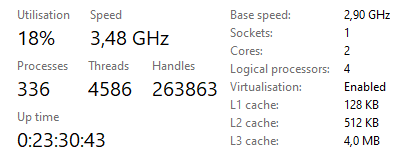
Cache acts as a high-speed buffer between the CPU and RAM, storing copies of frequently accessed data for instant retrieval.
Cache Levels:
- L1 Cache: Built into CPU core, 32-64 KB, 1-2 clock cycles
- L2 Cache: Close to CPU, 256KB-1MB, 3-10 clock cycles
- L3 Cache: Shared among cores, 4-32MB, 10-40 clock cycles
How it works:
- Cache Hit: Data found in cache - fast access
- Cache Miss: Data not in cache - must fetch from slower memory
- Temporal Locality: Recently used data likely to be accessed again
- Spatial Locality: Nearby memory locations often accessed together
Storage#
Storage provides permanent, non-volatile memory that persists data when the computer is powered off.
Types:
- HDD (Hard Disk Drive): Magnetic storage, 5-15ms access time, high capacity
- SSD (Solid State Drive): Flash memory, 0.1-0.2ms access time, faster but more expensive
- NVMe SSD: Direct PCIe connection, 3-7 GB/second transfer rates
Clock Frequency#
The system clock generates electrical pulses that synchronize CPU operations:
- Clock Speed: Measured in Hertz (cycles per second)
- Modern Speeds: Typically 2-5 GHz (billion cycles per second)
- Performance Impact: Higher frequencies allow more instructions per second
- Trade-offs: Faster clocks consume more power and generate more heat
Input/Output systems and peripherals#
The I/O subsystem manages communication between the computer and external devices, enabling user interaction and data exchange with the outside world.
I/O Controllers#
Specialized circuits that manage communication with peripheral devices:
- Function: Translate between CPU signals and device-specific protocols
- Buffer Management: Store data temporarily during transfers
- Status Monitoring: Track device availability and error conditions
- Interrupt Handling: Notify CPU when operations complete
Common Peripherals#
Input Devices:
- Keyboard: Converts keystrokes into digital signals
- Mouse: Tracks movement and button clicks
- Microphone: Captures audio input for processing
- Camera: Digitizes visual information
Output Devices:
- Monitor: Displays visual information from the graphics subsystem
- Speakers: Convert digital audio signals to sound waves
- Printer: Creates physical copies of digital documents
Storage Interfaces:
- USB: Universal Serial Bus for connecting various devices
- SATA: Serial ATA for connecting internal storage drives
- PCIe: High-speed expansion slots for graphics cards and NVMe drives
Number systems#
Understanding different number systems is crucial for computer science and reverse engineering, as computers operate using binary while humans prefer decimal representation.
binary#
The foundation of all digital computing, using only two digits: 0 and 1.
Key Concepts:
- Base-2 System: Each position represents a power of 2
- Bit: Single binary digit (0 or 1)
- Byte: 8 bits grouped together
- Word: CPU’s natural data size (32-bit or 64-bit)
Position Values:
128  64  32  16   8   4   2   1
2⁷   2⁶  2⁵  2⁴  2³  2²  2¹  2⁰
Example Conversion:
Binary:  10110101
Decimal: 128 + 32 + 16 + 4 + 1 = 181
Binary Operations:
- AND: 1 & 1 = 1, all others = 0
- OR: 0 | 0 = 0, all others = 1
- XOR: Same bits = 0, different = 1
- NOT: Flips all bits (0→1, 1→0)
hexadecimal#
Base-16 system using digits 0-9 and letters A-F, providing a compact way to represent binary data.
Hexadecimal Digits:
0 1 2 3 4 5 6 7 8 9 A B C D E F
0 1 2 3 4 5 6 7 8 9 10 11 12 13 14 15
Conversion Relationships:
- 4 binary bits = 1 hex digit
- 2 hex digits = 1 byte
- 8 hex digits = 32-bit value
Examples:
Binary:     1010 1100 1111 0001
Hex:        A    C    F    1
Result:     0xACF1

Decimal 255 = Binary 11111111 = Hex 0xFF
Common Hex Values:
- 0xFF: Maximum byte value (255)
- 0x00: Minimum value (0)
- 0xDEADBEEF: Common debug value
- 0x90: NOP instruction in x86 assembly
decimal#
The familiar base-10 system humans use daily, with digits 0-9.
Position Values:
1000  100  10   1
10³   10²  10¹  10⁰
Conversion Methods:
- Binary to Decimal: Sum powers of 2 for each 1-bit
- Hex to Decimal: Sum powers of 16 for each position
- Decimal to Binary: Repeatedly divide by 2, collect remainders
- Decimal to Hex: Repeatedly divide by 16, collect remainders
Basic networking concepts#
Network communication enables computers to exchange data across local and global connections, forming the backbone of modern computing infrastructure.
TCP/IP#
The Transmission Control Protocol/Internet Protocol suite provides the fundamental framework for internet communication.
IP (Internet Protocol):
- Function: Routes data packets between network nodes
- IPv4: 32-bit addresses (192.168.1.1)
- IPv6: 128-bit addresses for expanded address space
- Packet Structure: Headers contain source, destination, and routing information
TCP (Transmission Control Protocol):
- Reliable Delivery: Guarantees packet arrival and correct order
- Connection-Oriented: Establishes sessions before data transfer
- Error Correction: Retransmits lost or corrupted packets
- Flow Control: Manages transmission speed based on receiver capacity
Three-Way Handshake:
- SYN: Client requests connection
- SYN-ACK: Server acknowledges and responds
- ACK: Client confirms, connection established
graph TD
    A[Client] -->|SYN| B[Server]
    A -->|ACK| B
    B -->|SYN-ACK| A
    B --> C[Connection Established]
ports#
Logical endpoints that allow multiple network services to operate simultaneously on a single computer.
Port Ranges:
- Well-Known Ports (0-1023): Reserved for system services
- Registered Ports (1024-49151): Assigned to specific applications
- Dynamic Ports (49152-65535): Temporary assignments for client connections
Common Port Numbers:
- Port 80: HTTP web traffic
- Port 443: HTTPS secure web traffic
- Port 22: SSH secure shell
- Port 21: FTP file transfer
- Port 25: SMTP email sending
- Port 53: DNS domain name resolution
- Port 3389: RDP remote desktop
protocols#
Standardized rules that govern how data is formatted, transmitted, and received across networks.
Application Layer Protocols:
- HTTP/HTTPS: Web browsing and API communication
- FTP/SFTP: File transfer services
- SMTP/POP3/IMAP: Email communication
- DNS: Domain name to IP address translation
- DHCP: Automatic IP address assignment
Transport Layer:
- TCP: Reliable, connection-oriented communication
- UDP: Fast, connectionless communication (no delivery guarantee)
Network Layer:
- IP: Routing between different networks
- ICMP: Error reporting and network diagnostics (ping, traceroute)
Common Protocol Analysis:
- Wireshark: Packet capture and analysis tool
- Netstat: Display active network connections
- Nmap: Network discovery and port scanning
- tcpdump: Command-line packet analyzer
Security Implications:
- Packet Sniffing: Intercepting network communications
- Man-in-the-Middle: Intercepting and modifying traffic
- Port Scanning: Discovering open services for potential exploitation
- Protocol Tunneling: Hiding malicious traffic within legitimate protocols